



AI & Developer Tooling
Petal Pro v4 includes a suite of AI-powered admin tools and first-class Claude Code integration. This page covers the in-app AI chat, the MCP server for external AI clients, and the Claude Code configuration that ships with every project.
AI Admin Chat
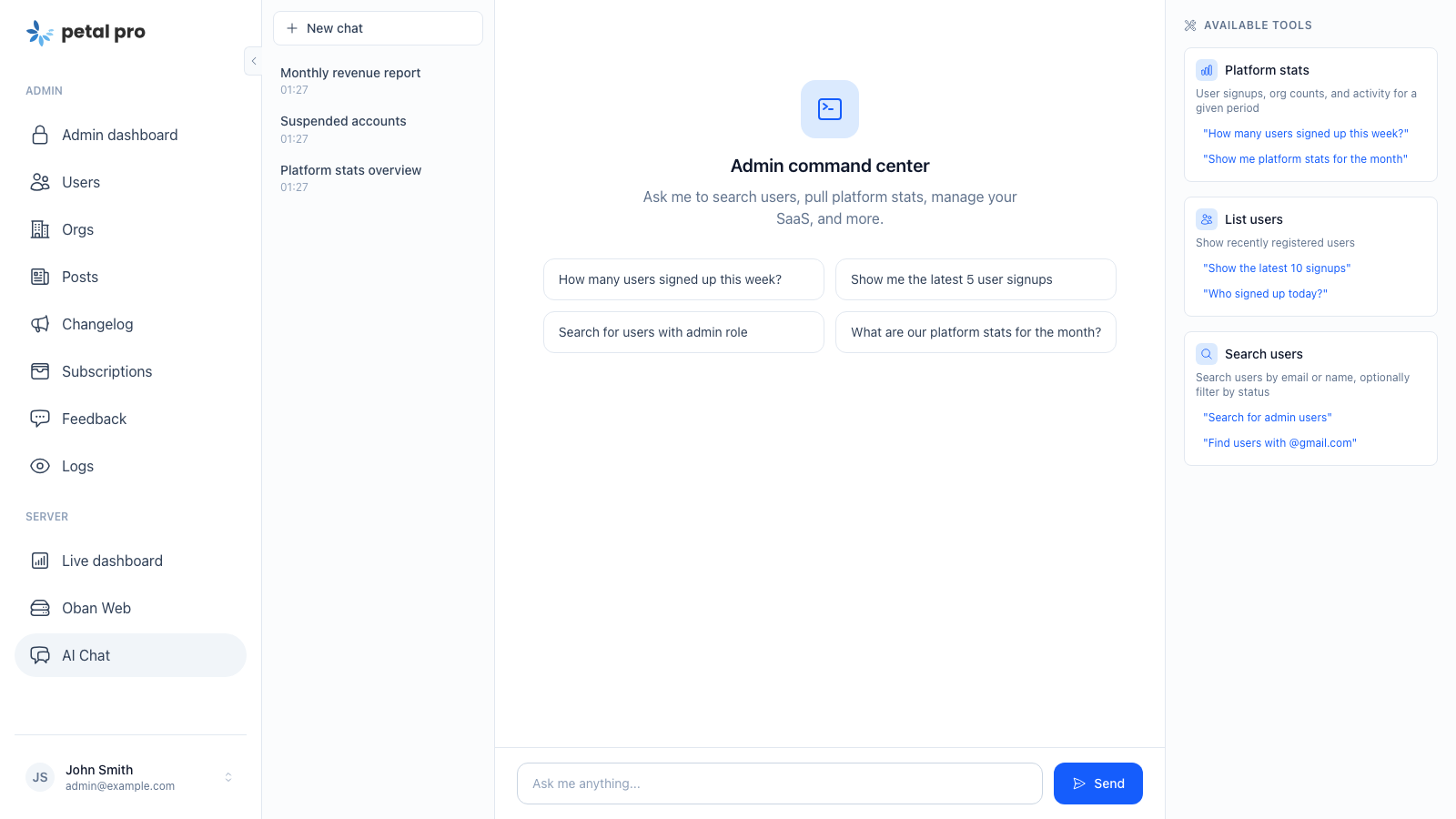
The AI Admin Chat is an admin-only chat interface that lets you interrogate your running Petal Pro app using natural language. Ask it to pull stats, look up users, manage orgs, or check AI usage costs — it figures out which tools to call, chains multiple calls if needed, and presents the results as readable text. It’s powered by Jido and ReqLLM using Google Gemini, and shares the same action registry as the Admin MCP Server.
Conversations are saved to the database and survive page reloads and server restarts. The sidebar lists recent chats so you can pick up where you left off.
v4 migration note: The AI Admin Chat was rewritten in v4 to use Jido and ReqLLM (replacing the LangChain-based implementation from v3). If you added custom LangChain tools in v3, you’ll need to reimplement them as native
Jido.Actionmodules described below. The tool surface is the same; only the implementation pattern changed.
Architecture
Admin LiveView
    │
    ▼
PetalPro.AI.Actions.AdminChatAction   (Jido.Action)
    │ streams responses from Gemini via ReqLLM
    │ runs tool loop until no more tool calls
    ▼
PetalPro.AI.AdminChat.ActionRegistry  (single source of registered actions)
    │ Jido.AI.Turn validates args + dispatches by name
    ▼
PetalPro.AI.AdminChat.Actions.*       (individual Jido.Action modules)
    ▼
Your Repo / Contexts
The default model is google:gemini-2.5-flash-lite, overridable via the :ai_admin_chat_model app env. Every call goes through PetalPro.AI.HTTP.client/1, which attaches PetalPro.AI.CostTrackerPlugin as a Req response step — token counts and cost are logged to ai_call_logs automatically.
Tools Are Native Jido Actions
Every tool is a Jido.Action module. The action declares its name, description, and a NimbleOptions schema, and Jido handles argument validation, JSON Schema generation for the LLM, and dispatch.
defmodule PetalPro.AI.AdminChat.Actions.ManageUser do
  use Jido.Action,
    name: "manage_user",
    description: "Manage a user account.",
    schema: [
      user_id: [type: :string, required: true, doc: "The user's UUID."],
      action: [
        type: {:in, ["suspend", "unsuspend", "delete", "undelete", "make_admin", "remove_admin"]},
        required: true,
        doc: "Action to perform."
      ]
    ]

  @impl true
  def run(%{user_id: user_id, action: action}, _context) do
    # ...
  end
end| Field | Purpose |
|---|---|
name |
Unique string identifier used in tools/call |
description |
Shown to the model — write it like a good function docstring |
schema |
NimbleOptions keyword list — emits as JSON Schema for the LLM |
run/2 |
Receives validated, atom-keyed params and a context map |
:in constraints emit as JSON Schema enum arrays so strict MCP clients see typed choices instead of free-form strings.
Action Registry
PetalPro.AI.AdminChat.ActionRegistry holds the @actions list and exposes two helpers used by both the chat LiveView and the MCP server:
# ReqLLM-shaped tool definitions (cached)
ActionRegistry.req_llm_tools()

# Action lookup map used by Jido.AI.Turn for dispatch (cached)
ActionRegistry.action_map()
Both results are memoised in :persistent_term, so the registry has zero per-request overhead.
Action modules live in lib/petal_pro/ai/admin_chat/actions/. The full list registered by default:
-
get_site_stats— user/org counts by period -
list_recent_users— recently registered users -
search_users— text search with filters -
manage_user— suspend, unsuspend, delete, undelete, change role -
list_orgs— organizations with member counts -
manage_org— rename, delete, list members -
get_ai_call_stats— AI usage costs and token breakdown -
list_changelog_updates— read changelog entries -
create_changelog_update— add a new changelog entry -
manage_changelog— update or delete changelog entries
AI Cost Tracking
Every Gemini call is automatically tracked. The mechanism:
-
PetalPro.AI.HTTP.client/1returns aReqclient withCostTrackerPluginattached. - When a response comes back from a known AI provider, the plugin extracts token counts and snapshots the current per-million-token price.
-
An
AICallLogrecord is inserted asynchronously viaTask.Supervisor— cost tracking failure never interrupts the AI call. -
The
operationanduser_idare read from the process dictionary (:ai_cost_context).
To set attribution context before making AI calls:
Process.put(:ai_cost_context, %{operation: :my_feature, user_id: user.id})
AdminChatAction already does this automatically (operation: :admin_chat).
Logs are viewable in the admin panel under AI → Call Logs, and queryable via the get_ai_call_stats tool. The AICallLog schema:
typed_schema "ai_call_logs" do
  field :provider, :string
  field :model, :string
  field :operation, :string
  field :input_tokens, :integer
  field :output_tokens, :integer
  field :input_price_per_million, :integer
  field :output_price_per_million, :integer
  field :total_cost_cents, :integer
  field :response_time_ms, :integer
  field :http_status, :integer
  field :error_message, :string
  belongs_to :user, PetalPro.Accounts.User
  timestamps(type: :utc_datetime, updated_at: false)
end
Daily Budget
The chat action enforces a per-user daily budget (default 500 cents / $5.00). Configure it in config/config.exs:
config :petal_pro, ai_daily_budget_cents: 500Configuration
The API key is read from config/runtime.exs via the :jido_ai keyring:
config :jido_ai, keyring: [
  google_gemini_api_key: System.get_env("GOOGLE_GEMINI_API_KEY")
]
Set GOOGLE_GEMINI_API_KEY in your environment. Without it, the action returns a descriptive error rather than crashing.
The model used is gemini-3.1-flash-lite-preview (configured in AdminChatAction). The action supports up to 8 tool-call iterations per message (configurable via config :petal_pro, ai_max_tool_iterations: 8).
Admin MCP Server
Petal Pro ships with a built-in Model Context Protocol (MCP) server that exposes your app’s admin tools to external AI clients such as Claude Code and Claude Desktop. Instead of logging into an admin panel to look up a user or check billing stats, you can ask your AI assistant directly — it talks to your running app over JSON-RPC 2.0, executes the relevant tool, and hands you back real data.
The Endpoint
All MCP traffic goes through a single HTTP endpoint:
POST /api/mcp
Authorization: Bearer <MCP_ADMIN_TOKEN>
Content-Type: application/json
The server speaks JSON-RPC 2.0 and accepts both single messages and batched arrays. Supported methods:
| Method | Description |
|---|---|
initialize |
Protocol handshake — returns server name, version, and capabilities |
tools/list |
Returns all registered tools with their input schemas |
tools/call |
Executes a named tool with arguments |
ping |
Health check |
Quick sanity check with curl:
curl -X POST http://localhost:4000/api/mcp \
  -H "Authorization: Bearer dev-mcp-token" \
  -H "Content-Type: application/json" \
  -d '{"jsonrpc":"2.0","id":1,"method":"tools/list"}'
Setup
The Token
The server authenticates via a static bearer token read from the MCP_ADMIN_TOKEN environment variable. In dev, a default of "dev-mcp-token" is used so you can get started immediately. Set a real secret for staging and production:
# runtime.exs already reads this — just set the env var
export MCP_ADMIN_TOKEN="your-long-random-secret"
On Fly.io:
fly secrets set MCP_ADMIN_TOKEN="your-long-random-secret"
The token is compared with Plug.Crypto.secure_compare/2 to avoid timing attacks.
The Route
The route is already wired in the router. You don’t need to add anything. For reference, the controller that handles requests is PetalProWeb.McpController.
Connecting Claude Code
Create a .mcp.json file at the root of your project (it’s gitignored by default):
{
  "mcpServers": {
    "petal-pro-dev": {
      "type": "http",
      "url": "http://localhost:4000/api/mcp",
      "headers": {
        "Authorization": "Bearer dev-mcp-token"
      }
    },
    "petal-pro-prod": {
      "type": "http",
      "url": "https://yourapp.fly.dev/api/mcp",
      "headers": {
        "Authorization": "Bearer your-long-random-secret"
      }
    }
  }
}
After saving, run claude mcp list or restart Claude Code — the petal-pro-dev server should appear. You can now ask things like “list the 5 most recent users” or “suspend user with id abc-123” directly in the chat.
Connecting Claude Desktop
Add the server to your Claude Desktop config (~/Library/Application Support/Claude/claude_desktop_config.json on macOS):
{
  "mcpServers": {
    "petal-pro": {
      "type": "http",
      "url": "https://yourapp.fly.dev/api/mcp",
      "headers": {
        "Authorization": "Bearer your-long-random-secret"
      }
    }
  }
}
Restart Claude Desktop and the tools will appear in the tools panel.
Built-in Tools
The following tools ship with Petal Pro. They’re all native Jido.Action modules under lib/petal_pro/ai/admin_chat/actions/ and registered in PetalPro.AI.AdminChat.ActionRegistry.
get_site_stats
Returns platform metrics — total users, total orgs, and new signups/orgs for a given period (today, week, month, all). Useful for a quick health check.
list_recent_users
Lists recently registered users with basic profile info.
search_users
Text search across user accounts with optional status filters.
manage_user
Performs account management actions on a single user identified by UUID. Available actions:
| Action | Effect |
|---|---|
suspend |
Prevents login |
unsuspend |
Re-enables login |
delete |
Soft-deletes the account |
undelete |
Reverses soft-delete |
make_admin |
Grants admin role |
remove_admin |
Revokes admin role |
All actions are audit-logged via Logs.log_async/2.
list_orgs
Lists organizations with member counts. Accepts an optional search term and result limit.
manage_org
Manages an organization by slug or UUID. Available actions: rename (requires new_name), delete, list_members.
get_ai_call_stats
Returns AI usage and cost statistics for a configurable lookback period (default 30 days, max 365). Includes total calls, token counts, costs in both cents and dollars, and breakdowns by model and operation.
list_changelog_updates, create_changelog_update, manage_changelog
Tools for reading and managing your app’s changelog entries from the AI client.
Adding a Custom Tool
Define a Jido.Action module under lib/petal_pro/ai/admin_chat/actions/:
defmodule MyApp.AI.AdminChat.Actions.GetFeedbackStats do
  @moduledoc "Admin chat tool: feedback submission counts by status."

  use Jido.Action,
    name: "get_feedback_stats",
    description:
      "Get feedback submission counts grouped by status (open, in_progress, resolved). " <>
        "Optionally filter by number of days to look back.",
    schema: [
      days: [
        type: {:or, [:pos_integer, {:in, [nil]}]},
        default: nil,
        doc: "Look back this many days. Omit to return all-time counts."
      ]
    ]

  import Ecto.Query

  alias MyApp.Feedback.Submission
  alias MyApp.Repo

  @impl true
  def run(%{days: days}, _context) do
    base =
      if days do
        since = DateTime.add(DateTime.utc_now(), -days, :day)
        from(s in Submission, where: s.inserted_at >= ^since)
      else
        Submission
      end

    counts =
      base
      |> group_by([s], s.status)
      |> select([s], {s.status, count(s.id)})
      |> Repo.all()
      |> Map.new()

    {:ok, %{period_days: days, counts: counts}}
  end
end
Append it to @actions in PetalPro.AI.AdminChat.ActionRegistry:
@actions [
  # ... existing actions ...
  MyApp.AI.AdminChat.Actions.GetFeedbackStats
]
The tool immediately appears in both the admin chat UI and the MCP server — one registration covers both interfaces. Add a test under test/petal_pro/ai/admin_chat/actions/ calling run/2 directly.
Removing a Tool
Delete the module from @actions in ActionRegistry. The tool disappears from tools/list and tools/call at the next compile. You can delete the module file (and its test) too if you don’t need it.
Security Considerations
-
The token is the only auth mechanism. Treat
MCP_ADMIN_TOKENlike a root password — use a long random string in production and rotate it if compromised. - Tools run with full database access. Every tool executes in your app process with your Repo. Don’t add tools that expose raw SQL execution or unfiltered bulk data.
-
Destructive actions are logged.
manage_userandmanage_orgboth callLogs.log_async/2so you have an audit trail. -
Don’t commit
.mcp.json. It’s gitignored by default. If you ever accidentally commit it with a production token, rotate the token immediately. - Consider network restrictions for production. If your MCP client only needs to reach production from your own IP, add a firewall rule or Fly.io private networking rather than exposing the endpoint publicly.
Claude Code Integration
Petal Pro v4 ships with first-class Claude Code support. Sub-agents, skills, recipes, and scoped CLAUDE.md files are all pre-configured — you get an AI-aware codebase out of the box.
Sub-Agents
Sub-agents are specialized Claude Code agents that automatically activate based on context. They live in .claude/agents/ and are invoked by Claude Code when relevant.
| Agent | Description |
|---|---|
schema-architect |
Designs database schemas following Petal Pro conventions (UUID v7 PKs, proper indexes, on_delete strategies) |
test-runner |
Runs tests, interprets failures, and suggests fixes |
elixir-reviewer |
Reviews Elixir code for correctness, conventions, and common pitfalls |
heex-reviewer |
Reviews HEEx templates for proper interpolation, component usage, and accessibility |
ui-ux-reviewer |
Reviews UI/UX for design quality, usability, and consistency with the app’s design system |
You don’t invoke these directly — Claude Code activates the appropriate agent automatically.
Skills
Skills are slash commands for scaffolding new code. They enforce project conventions so generated code is consistent with the rest of the codebase. Run them from Claude Code with an optional argument describing what you want.
Scaffolding
| Command | Description |
|---|---|
/new-liveview |
Scaffolds a new LiveView page — layout wrapping, imports, assign patterns, handle_params/handle_event structure |
/new-context |
Scaffolds a new Phoenix context module — CRUD patterns, filters, error handling, logging |
/new-email |
Creates a new transactional email template with inline styling and the deliver/render pipeline |
/new-oban-worker |
Scaffolds an Oban background worker — queue config, retry strategy, logging, error handling |
/schema-migration |
Guides schema and migration changes — UUID v7 PKs, indexes, Ecto schema patterns |
Feature Addition
| Command | Description |
|---|---|
/add-org-feature |
Scaffolds a new org-scoped resource end-to-end: schema with org_id, context, migration, LiveView pages, routes, GDPR updates |
/add-notification |
Adds a new notification type end-to-end: schema, context function, email template, component renderer |
/add-admin-page |
Scaffolds an admin section page with DataTable, Flop pagination, sorting, and filtering |
/add-api-endpoint |
Adds a new REST API endpoint with OpenAPI specs, bearer auth, JSON views, and tests |
/add-billing-feature |
Guides through billing additions: new plans, subscription gates, webhook handlers, Stripe calls |
/add-route |
Safely adds routes to the router — enforces live_session grouping, pipeline selection, scope conventions |
Utilities
| Command | Description |
|---|---|
/ci |
Simulates the full GitHub Actions CI pipeline locally and fixes failures |
/gdpr-compliance |
Ensures new user-associated schemas are included in data export and deletion workflows |
/liveview-js |
Guides use of Phoenix.LiveView.JS for client-side UI state (show/hide, toggles, tabs) instead of server round-trips |
Recipes
Recipes are slash commands for larger-scale customizations — removing features, switching architecture, adding integrations. See the Recipes page for the full list.
CLAUDE.md Files
The project ships with scoped CLAUDE.md files at multiple levels. Claude Code reads these automatically when working in each directory, giving it the right context without you having to explain it every time.
| File | Scope |
|---|---|
CLAUDE.md (root) |
Project overview, feature table, dev scripts, architectural patterns, config keys |
lib/CLAUDE.md |
Elixir conventions, Ecto guidelines, Mix guidelines |
lib/petal_pro/CLAUDE.md |
Business logic patterns, multi-tenancy, auth, billing, background jobs |
lib/petal_pro_web/CLAUDE.md |
Web layer conventions, LiveView patterns, layout system |
assets/CLAUDE.md |
JS/CSS conventions, Tailwind v4 setup, Alpine.js patterns |
test/CLAUDE.md |
Testing conventions, Mimic mocking, factory patterns |
How to Use
Installation
npm install -g @anthropic-ai/claude-codeStarting a session
cd your-petal-pro-project
claude
Claude Code picks up all the CLAUDE.md context files automatically.
Running a skill
Type the slash command with an optional description of what you want:
/new-liveview A settings page for managing notification preferences/add-org-feature Projects — users can create and manage projects within their orgRunning a recipe
/recipes:remove-billingUsing sub-agents
Sub-agents activate automatically — when you ask Claude Code to review a template it will invoke heex-reviewer, when you ask it to design a schema it will use schema-architect. You don’t need to call them explicitly.
Asking Claude Code to work on a task
The workflow commands handle the full development cycle:
/plan Add a feedback widget to the dashboardThis generates a structured task file. Then:
/do_taskThis implements it. Then:
/pushThis runs CI, commits, and pushes.