



Petal Pro 4.5 - Settings overhaul, safer defaults and toasts

Every settings screen gets a redesign your users will notice, production gets HTTPS and real client IPs by default, and flash messages become toasts.

- Name
- Matt
2 hours ago
Petal Pro 4.5 is out. Most of this release is stuff your users will actually see, so that’s where we’ll start.
Settings, redone
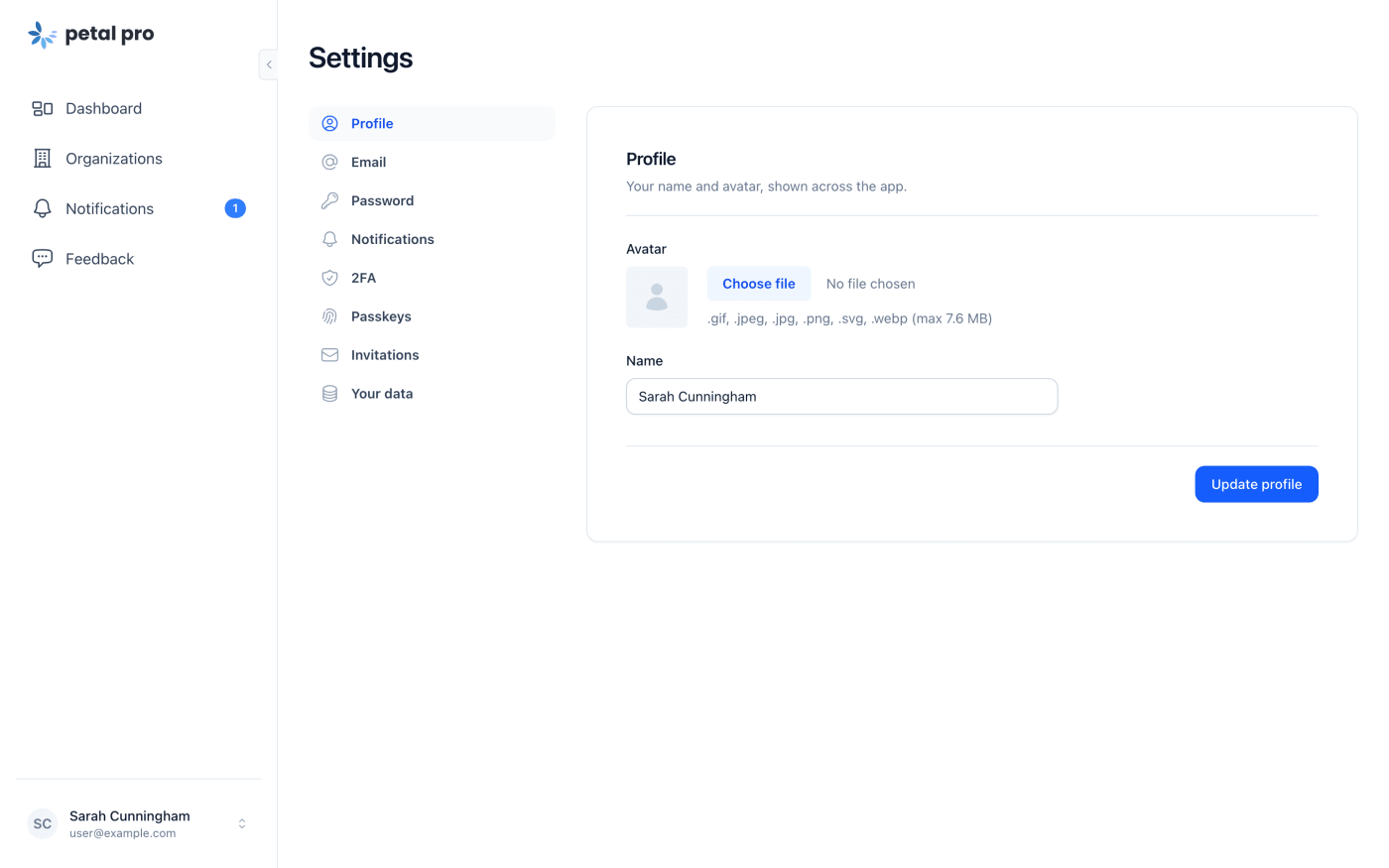
In 4.5 the settings screens move to a two-pane layout. On larger screens the nav sits in its own pane with a highlighted active item, and the content gets a proper card. That’s about a dozen user, org and billing screens, with no code changes on your end.
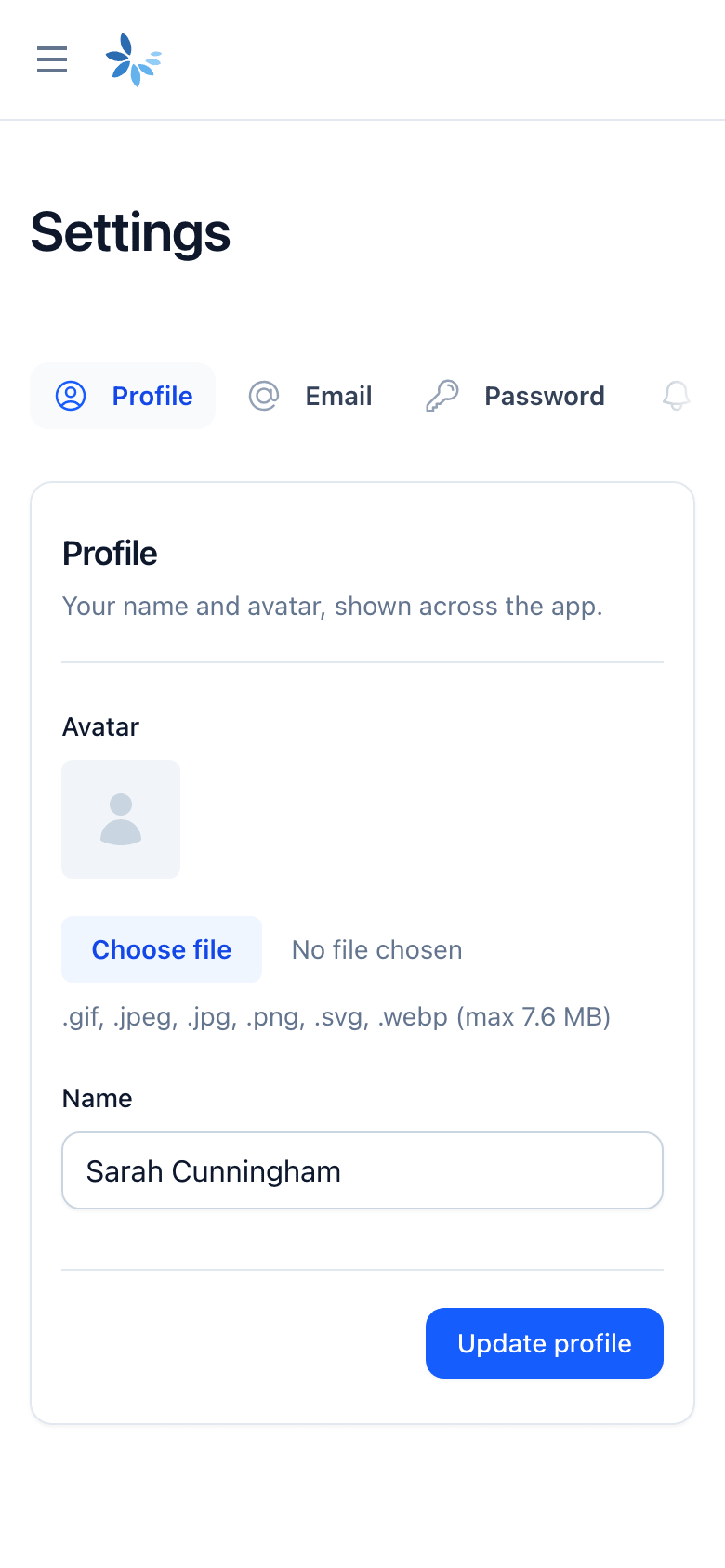
On phones the nav used to be a stacked menu. Now it’s a horizontal strip that fades at the edges and keeps the active item centred.
A few other things across settings:
- Every screen has a header with one line saying what it’s for, plus its own page title. Browser tabs read “Email - Petal” or “Passkeys - Petal” instead of a plain “Settings”.
- Nav labels are nouns now. “Edit profile” is “Profile”, “Change email” is “Email” and so on.
- Text fields are capped at a sensible width (they were stretching to about 900px) and every form ends with the same action bar, primary button on the right.
- Billing gets a real plan card with the product, a trial badge, price, last invoice and next charge. Cancelling opens a dialog that shows plan, price and next charge before you confirm.
- We fixed a billing screen crash for metered subscriptions. In the first days of a month, if the billing period started the month before, the page fell over. It doesn’t now.
- Account deletion lives in a danger zone that lists the consequences up front.
- Notification preferences are switches. Channels you’ve forced on show as disabled “always on” switches instead of a checkbox you can’t click.
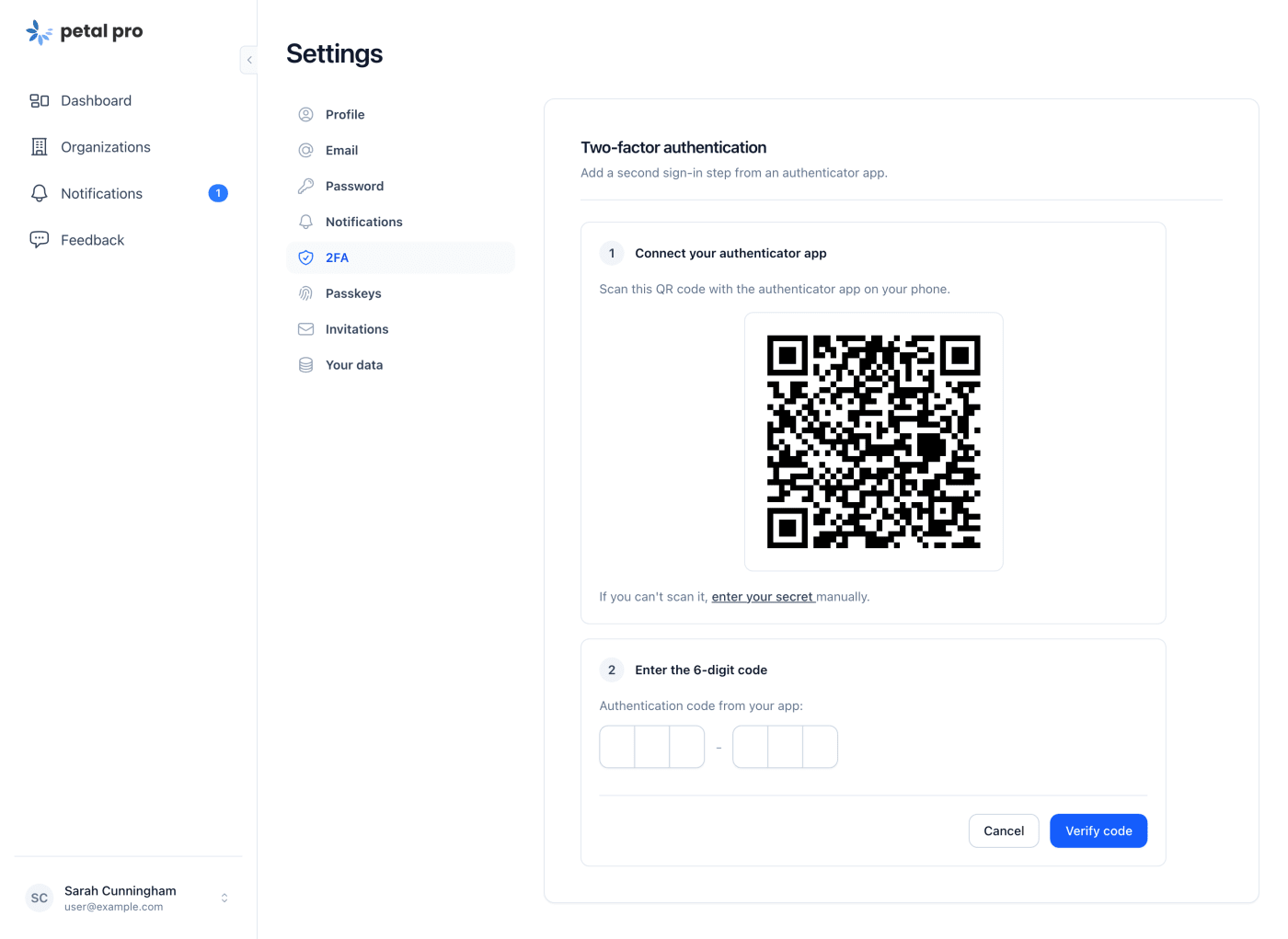
- 2FA setup is two numbered steps. The code field is a 6-segment input that works with SMS and password manager autofill, and disabling 2FA or regenerating backup codes confirms in a dialog that says exactly what it does.
- Passkeys got a dark mode pass so it matches everything else.
Safer production defaults
Two security changes, both of which touch how you deploy.
Client IPs. Pro used to take the first x-forwarded-for entry as the user’s IP, and the client can write that. So last_signed_in_ip and impersonation audit entries could hold whatever the client sent. Now Pro uses the connection peer unless you tell it which proxy header to trust, with CLIENT_IP_HEADER or TRUSTED_PROXY_HOPS. If you’re on Fly, add CLIENT_IP_HEADER = "fly-client-ip" to the [env] block in fly.toml, or sign-ins will record Fly’s proxy address. Sentry events also get request context, with sign-in secrets masked.
HTTPS. Production now forces https behind proxies like Fly, Render and Railway. Plain http gets redirected, HSTS is sent, and session and remember-me cookies are marked Secure. The session cookie is also SameSite=Lax and HttpOnly. It’s controlled by FORCE_SSL, on by default in prod. Only set FORCE_SSL=false if your proxy sends no forwarded-proto header, otherwise every request redirects to itself. One gotcha: an HTTP health check will get a 301 unless it sends X-Forwarded-Proto: https or you exclude its path. Default TCP checks are fine.
The smaller stuff
-
Flash messages are toasts. Every
put_flashwith:info,:success,:warningor:errorshows as a stacked, swipe-to-dismiss toast with no changes on your end. -
Empty states across the app use
<.empty>: a title, one sentence and a single action where there’s something to create. -
Status pills share one colour map, so the same state looks the same on every screen, and every row in Admin > Users gets a role chip. A few colours moved (trialing and the admin role are now info, and on the dashboard unconfirmed and not-onboarded users get a warning and a gray chip instead of a red X). Tweak
status_color/1orrole_color/1if you want the old ones back. - On iOS the sidebar profile row and the bottom of the page no longer hide under the browser bar.
- The unsubscribe pages are clickable again (an overlay was painting over them).
- Flash messages on controller-rendered pages no longer log an “unable to push hook event” error in the browser console. That one was fixed upstream in petal_components 4.18.0.
- The Stripe logo on the landing page draws in full again (the “e” was missing) and stops logging an SVG path error.
- Tom Select is gone. The admin membership pickers and the generators use the petal_components combobox, so that’s one fewer npm package, about 12 KB less CSS, and selections survive a LiveView reconnect.
- Four Pro components (color_scheme_switch, language_select, local_time and social_button) retire in favour of the free petal_components versions. The colour scheme switch now follows system preference changes live and syncs across tabs.
Upgrading
There are some renames. The main ones:
-
Run
mix deps.update petal_componentsafter taking the release (4.5 needs ~> 4.18, so expect 4.18.0 or later). -
Layouts.empty/1is nowLayouts.blank/1. -
If you edited
PetalProComponents, match the 4.5 import list in the upgrade guide (step 1), or the build fails with “call is ambiguous”. -
Flop 0.27 needs
:ecto_typeon every join field and custom field in your own Flop schemas. It also caps filters at 20 per request by default. -
color_scheme_switchnow needs anid, and<PetalProWeb.ColorSchemeSwitch.color_scheme_switch_js />inhead.html.heexbecomes<.color_scheme_script />. -
local_timeneeds anidtoo, and usesat=andformat=.social_buttonusesprovider=andhref=, andtwitteris nowx. -
The Pro
ColorSchemeSwitch,LanguageSelect,LocalTimeandSocialButtonmodules are deleted, so a fully qualified call to one of them breaks. Use the plain tags. -
<.combo_box>becomes<.field type="combobox">, and theremove_buttonplugin becomesclearable. -
ChangelogHelpers.status_badge_class/1is gone. Use<.status_badge>in its place. -
Delete the old ColorSchemeHook, LocalTimeHook and ComboBoxHook files and their hooks/index.js lines, drop the combo-box.css import, and
npm uninstall tom-select. luxon can go too. -
Menu and sidebar DOM ids changed. They’re name-based now, and the user-menu colour switch id is
sidebar-user-profile-color-scheme, so update any JS, CSS or tests that target them. -
If you edited
colors.css, change@theme inlineto@themeon the alias block. Otherwise colours liketext-danger-400can quietly fall back to gray. - The old show/cancel delete handlers on Your Data are gone, so code or tests that call them will break.
-
On Fly, the
CLIENT_IP_HEADERline above, and check your health checks.
Customised sidebar_tabs_container/1 or sidebar_menu_item/1 in page_components.ex? You’ll need to merge those by hand. Tests asserting old labels and copy will need a touch too, and so will any that look for data-confirm, the notification checkboxes or the old empty-state markup. It’s all step by step in the upgrade guide, and the full list is in the changelog.
Want to click around first? The demo is the quickest way. Sign in with admin@example.com or user@example.com, password “password”.
Any trouble upgrading, give us a shout in Discord.
Cheers, Matt and Nic
More posts

- Name
- Matt

- Name
- Matt

- Name
- Matt


- Name
- Matt


- Name
- Nicolas

- Name
- Nicolas


- Name
- Franz Bettag